
Skip to content

Just My Blog

Just great and interesting articles and more!

  • Home
  • Tips & Tricks
  • Toggle search form

How to add a pre-filter to SSRS Report using FetchXML

Posted on 5 Oct 202210 Feb 2024 By Mohamed Elgharably

Pre-filtering is one of the most important and useful features of reports in Microsoft Dynamics CRM.

Pre-filtering allows filtering of the report data using the Advance Find functionality and enables users to create context-sensitive reports and return more relevant data.

Pre-filtering passes the set of selected records or a specific record for which the report is being run in such a way that the report is executed, and the data is pulled from the context of the current (or selected) record.

Follow these steps to add a pre-filter in SSRS report using Fetch-XML
  1. Add parameter in the report itself -make it internal or hidden and allow blank and allow null

2. Pass this parameter to the dataSet
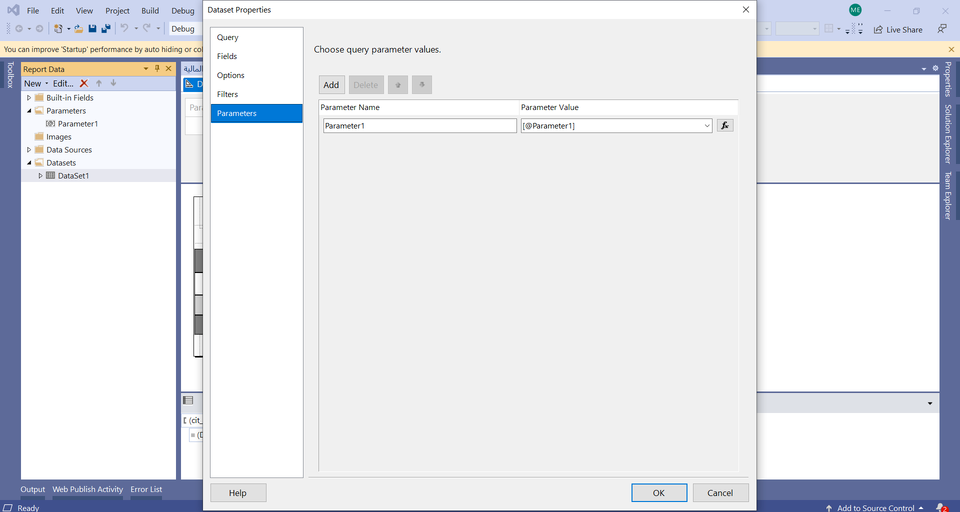
3. Add this attributes <enableprefiltering="1" prefilterparametername="Parameter1"> to the main entity-tag in the fetch to be like:

<entity name="salesorder" enableprefiltering="1" prefilterparametername="Parameter1">

Dynamics CRM Tags:FetchXML, Reports, SSRS

Post navigation

Previous Post: Query hierarchical data using FetchXML
Next Post: Cloud flow monitoring in Application Insights

Categories

  • Azure (2)
  • Azure DevOps (2)
  • Dynamics CRM (4)

Tag cloud

Application Insights (1) Cloud flows (2) DevOps (3) FetchXML (2) Monitoring (2) Reports (1) SSRS (1)

Dynamics CRM Newsfeed

  • Optimize workforce operations across people and AI agents with Dynamics 365
  • Customer experience leadership in the age of AI: A new operating model with Dynamics 365
  • What’s New in Dynamics 365 Field Service Mobile
  • Reinventing source-to-pay with agentic ERP
  • Turning Copilot into a system of action with Dynamics 365 Sales and Service plug-ins in Copilot Cowork

Copyright © 2024 Just My Blog -

Powered by PressBook WordPress theme